
Parallel Auctions
Choose Parallel Mode in Lot Details to allow customers to bid on multiple items during the same sale window.
Without sessions
Section titled “Without sessions”Set the Lot Start Date and Lot End Date. Assign the items and confirm the end follows the start. The lot controls the dates of its child auctions.
With sessions
Section titled “With sessions”Enable Has Sessions? and enter each session’s start, end, and item range. Each range receives the schedule of its assigned session.
Example: session 1 includes items 1–10 from 10:00 to 11:00; session 2 includes items 11–20 from 12:00 to 13:00. Use the actual date as well as the time for each row.
Extensions
Section titled “Extensions”The lot offers Extend auctions on bid?, a last-seconds window, an extension duration, and Extend all auctions in lot?. Decide whether a late bid should delay only its item or the wider sale before publishing.
Completion
Section titled “Completion”Run the closing cron throughout the sale. Review all item results before creating winner orders manually, or select automatic order creation if that is your intended workflow.
Demo example
Section titled “Demo example”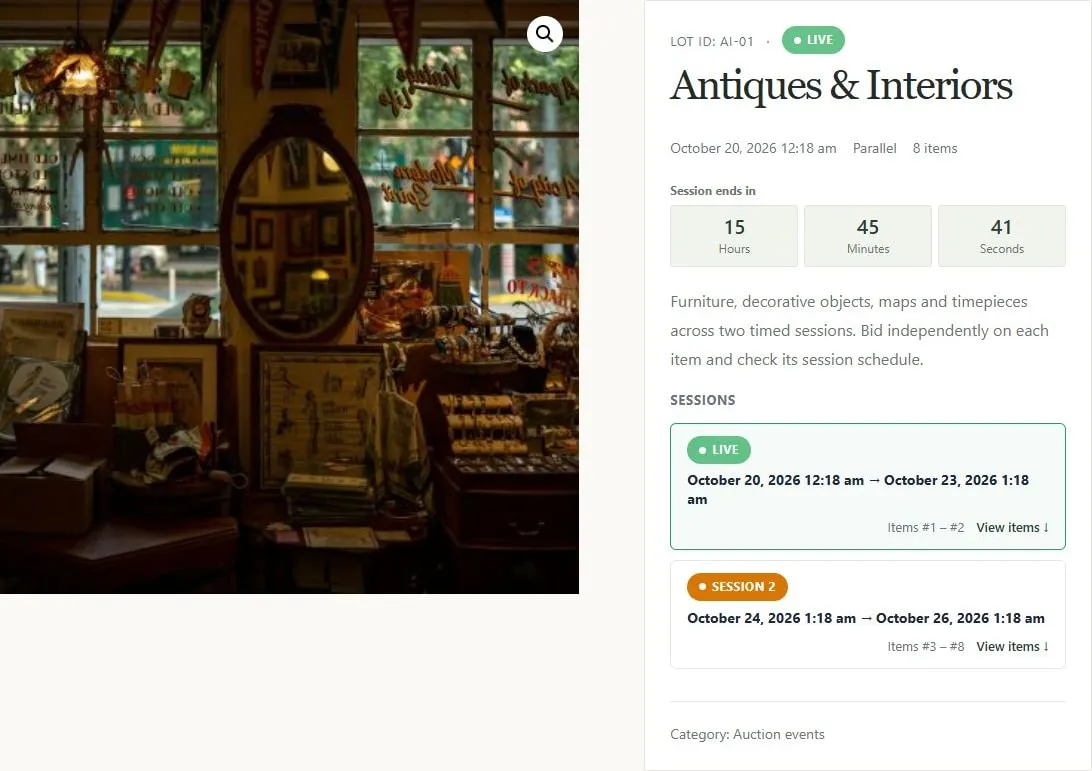
Parallel event with live and upcoming session schedules and item ranges.