
Catalog & Base Pages
Open Auctions → Settings to configure auction and lot visibility independently.
General: auction catalog
Section titled “General: auction catalog”Select Auctions Base Page. Configure Past auctions, Future auctions, and whether to mix auctions with ordinary products on shop, category, tag, and search pages.
The default auction sorting options include auction-specific bid and date ordering. Choose the order that matches how customers browse your sale.
Lots: lot catalog
Section titled “Lots: lot catalog”Configure the lot base page, default lot sorting, and the equivalent past/future and shop visibility options. Lot containers and their auction items are different products; check both sets of settings if a catalog appears incomplete.
A published item is missing
Section titled “A published item is missing”- Check the product’s publication state and catalog visibility.
- Check whether it is future, active, or finished.
- Review the corresponding archive settings.
- Open the selected base page directly.
- Clear the relevant page cache and check the closing process.
To place a selected list on another page, use shortcodes. Displaying a shortcode does not change the product’s underlying auction state.
Demo example
Section titled “Demo example”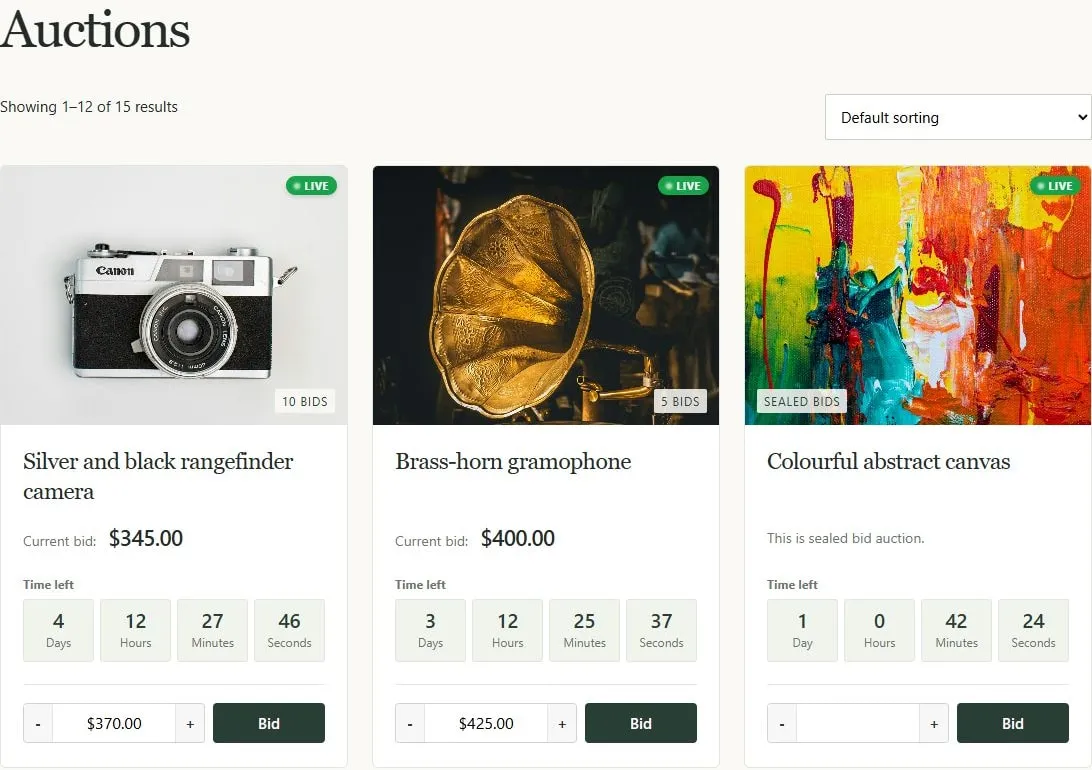
Auction catalog with sorting, live status badges, bid counts, and archive bidding forms.